
HPE ARUBA WIRELESS SOLUTION
HPE Aruba warehouse Wi-Fi for scanners, forklifts and aisle roaming
Prepared by Xunhui Information · English publication: 2026-11-12
Design Aruba warehouse Wi-Fi for changing inventory, high mounting points and scanner movement. Validate coverage and roaming along operational routes before fixing AP quantities.

This reference design is a starting point for project discovery, not a completed customer case. Final quantities and settings require site measurements, endpoint compatibility checks and a release-specific implementation design.
1. Requirements analysis
| Requirement | Discovery and design input |
|---|---|
| Physical environment | Record ceiling/rack height, aisle width, materials, doors, freezer zones, temperature and dust. |
| Mobile operations | Map picking, replenishment, forklift and loading routes; record transactions, timeouts and travel speeds. |
| Client compatibility | Inventory scanners and vehicle clients, drivers, bands, roaming and power saving; retain representative units. |
| Installation and recovery | Confirm mounting, cable protection, maintenance access and operations that cannot be interrupted. |
Workload and capacity example
Illustrative workload: 80 handhelds plus 20 vehicle clients, each peaking at two scans per second. Measure WMS request/response sizes, transaction latency and retry behavior. Low average throughput does not remove the need for continuity at aisle turns and roaming points. Determine AP quantities from rack attenuation, client uplink and route tests, not an area-per-AP promise.
Deliverables at this stage: a measured floor plan, client/application inventory, current topology and dependencies, agreed test objectives and constraints. Keep associated-client counts, active-client counts and concurrent application demand as separate inputs.
2. Solution design
Scanners and vehicle terminals → Aruba APs designed around aisles and work areas → suitable PoE access → WMS/MES service zones. Management and authentication follow the selected architecture and endpoint capabilities.
Survey inventory and operating paths
Capture rack dimensions, stored materials, loading doors and scanner working heights. Calibrate a predictive survey with a temporary AP, then produce installation drawings. Include full and low inventory, doors and freezer boundaries in the test plan. Final quantities depend on these measurements.
Match installation and clients
Choose antenna patterns and environmental ratings for the mounting location. An outdoor-rated candidate still needs a temperature, condensation and mounting review. Third-party antennas require separate regulatory and support consideration. Inventory scanner firmware, power-saving behavior and application timeouts before changing roaming settings.
Validate movement and change control
Test representative clients along picking, forklift and loading routes, recording BSSID changes and WMS/MES transaction behavior. Enable roaming features only after compatibility testing. Retain installation photographs, antenna orientation and test tracks. Repeat the key route after rack changes or a major client firmware update.
3. Network topology and forwarding
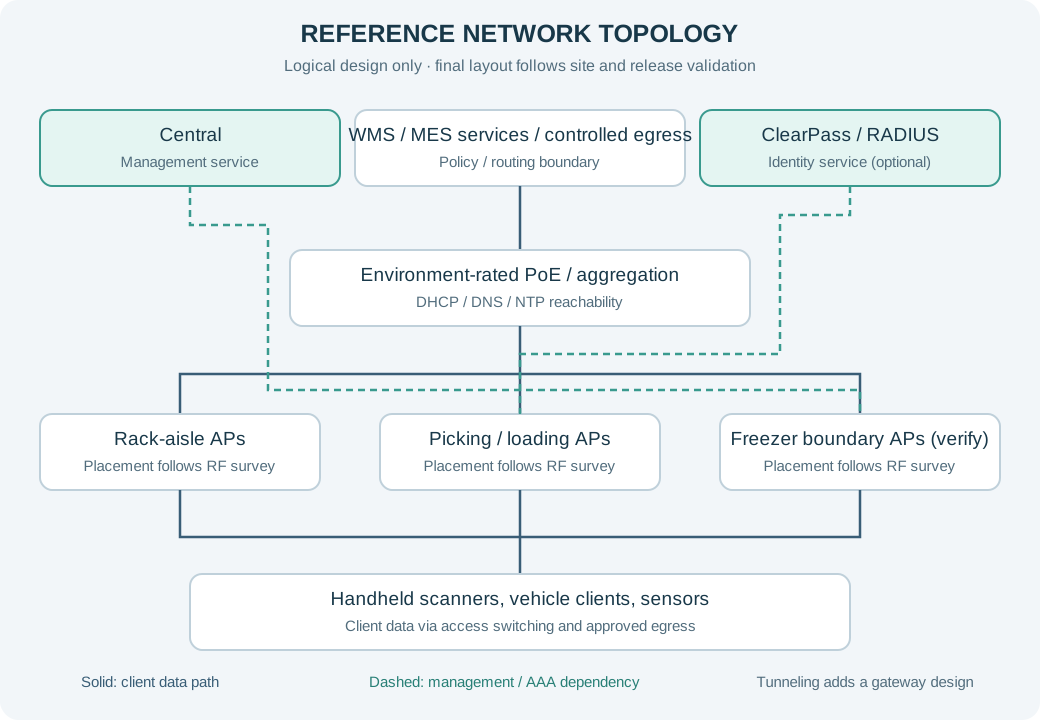
Route scanner traffic to defined WMS/MES services and separate maintenance and other IoT roles. Bridging requires explicit VLAN and addressing boundaries along mobile routes. A tunnel alternative adds supported gateways and its own transport and failure-domain review. The solid diagram path is the bridge reference, not an automatically included tunnel deployment.
Dashed paths denote logical management or authentication dependencies, not physical direct cables. Central is the management service, not the client data-plane transit point. If tunneling is chosen, redraw and validate the AP-to-gateway path and the authenticator location for that mode.
SSID, segment and access-policy example
| Segment / example VLAN | Access policy |
|---|---|
| SCANNER / VLAN 310 | Permit WMS/MES and required DNS/NTP; validate authentication against client capability. |
| OPERATIONS / VLAN 320 | Authorize operational laptops separately; avoid sharing scanner credentials. |
| IOT / VLAN 330 | Allow sensors and other endpoints only to designated services; document exceptions by class. |
| MGMT / VLAN 399 | Separate infrastructure management and preserve change records and installation identifiers. |
Names and VLAN IDs above are illustrative and must be mapped to the customer address plan. A VLAN is not a complete security boundary: enforce the approved ACL/firewall/role policy at the selected forwarding points and verify both allow and deny behavior. Publish only the minimum necessary SSIDs and verify legacy-client exceptions separately.
4. Implementation plan
- Operations discovery:Agree full-stock and dispatch peaks, routes and WMS timeouts; document transaction failures and weak areas.
- Predictive design:Model rack materials/heights and aisle/cross-aisle placement, allowing for antenna orientation and safe installation.
- Onsite calibration:Trial an AP at its proposed height and measure with production-equivalent scanners; update the design of record.
- Foundation and profiles:Build VLANs, power and management paths; enable authentication and roaming features incrementally after client testing.
- Transaction validation:Repeat route scans and correlate BSSID, roam timing, loss and application logs; repeat under stocked/closed-door conditions.
- Installation and handover:Use approved work windows; deliver placement, antenna orientation, cable mappings, test tracks and change-triggered resurvey rules.
Change control and rollback gate
Before each batch, name the change owner, business approver and recovery operator. Preserve the approved pre-change configuration and verify that the hardware/software supports the intended recovery. Stop or roll back if critical transactions fail, identity rules are wrong or agreed recovery limits are exceeded. Capture timestamps and logs before altering the next variable.
5. Configuration and procurement checklist
| Candidate / component | Items to confirm |
|---|---|
| AP-565 | Regional SKU, current availability, supported software, power, included components and lifecycle. |
| AP-675 | Regional SKU, current availability, supported software, power, included components and lifecycle. |
| AP-735 | Regional SKU, current availability, supported software, power, included components and lifecycle. |
| Management and access | Management version, device tier, term, account ownership, AAA capacity and required service integrations. |
| Installation and services | Mounts, antennas, power supplies, optics, cabling, survey, commissioning, training and agreed support scope. |
6. Acceptance and operational handover
- Survey primary and neighboring coverage and SNR at scanner working height along picking and loading routes.
- Repeat moving transactions with fixed client models and firmware; record roam location, packet loss and application failures.
- Retest weak areas with high inventory and closed doors, retaining tracks and photographs.
- With operations approval, test an AP or uplink interruption and document service degradation and recovery.
Agree numeric coverage, SNR, packet-loss, latency and recovery thresholds with the application owner before the pilot. Record locations, representative clients, load and software so results can be reproduced.
7. Prepare a project request
Send scaled plans, device and application schedules, current software and topology, power and cabling records, destination and rollout constraints. We use these inputs to discuss a project-specific configuration and quotation.
8. Regional and architecture checks
Product families above are candidates for evaluation. Confirm exact destination SKUs, certifications, permitted channels and software support before ordering. For mainland China, global 6 GHz capability does not establish local permission to enable it. AOS 8, AOS 10 and Central features require version-specific verification.
Apply the guidance to your project
Share the model, quantity, destination and existing network so we can discuss the complete configuration.
Discuss configuration & quotation ↗