
HPE ARUBA WIRELESS SOLUTION
HPE Aruba campus Wi-Fi for classrooms, students and residence halls
Prepared by Xunhui Information · English publication: 2026-11-12
Plan classroom and residence-hall wireless demand, separate staff, student and guest access, and validate authentication surges and building transitions.

This reference design is a starting point for project discovery, not a completed customer case. Final quantities and settings require site measurements, endpoint compatibility checks and a release-specific implementation design.
1. Requirements analysis
| Requirement | Discovery and design input |
|---|---|
| Academic peaks | Use timetables for classrooms, lecture halls, libraries and exam login peaks. |
| People and device identities | Define staff, student, visitor and shared-device roles and leaver revocation. |
| Residence and building differences | Record residence walls, outlets, evening demand and inter-building mobility. |
| Shared-service dependencies | Review identity, certificates, DHCP pools, DNS, learning systems and Internet capacity. |
Workload and capacity example
Illustrative classroom load: 6 rooms × 60 students × 80% online participation × 1 learning device gives about 288 active clients. Measure synchronized association and authentication separately. Keep distinct evening residence, exam-login and ordinary teaching models; a radio association limit is not teaching capacity.
Deliverables at this stage: a measured floor plan, client/application inventory, current topology and dependencies, agreed test objectives and constraints. Keep associated-client counts, active-client counts and concurrent application demand as separate inputs.
2. Solution design
Teaching and residence clients → zone-specific Aruba APs → building PoE access and campus aggregation → learning services or Internet. Identity services define roles; management is organized by campus and building.
Size the academic peak
Treat lecture halls, classrooms, libraries and residences as different demand zones. Class starts and exam logins stress authentication and addressing as well as airtime. Build an application workload from timetables and participation, then calibrate it in a pilot.
Map identities to access
Define distinct staff, student, guest and shared-device roles. Align directory integration, onboarding and leaver revocation. Document limited-access exceptions for equipment that cannot use enterprise authentication. Test the intended visibility of teaching displays and shared printers.
Roll out building by building
Use seat layouts for lecture-hall capacity and measured room attenuation for residences. Verify addressing and session behavior across buildings for the chosen forwarding mode. Standardize naming, management groups, time services and access ownership. Keep separate classroom and residence peak-hour reports and a building-level rollback plan.
3. Network topology and forwarding
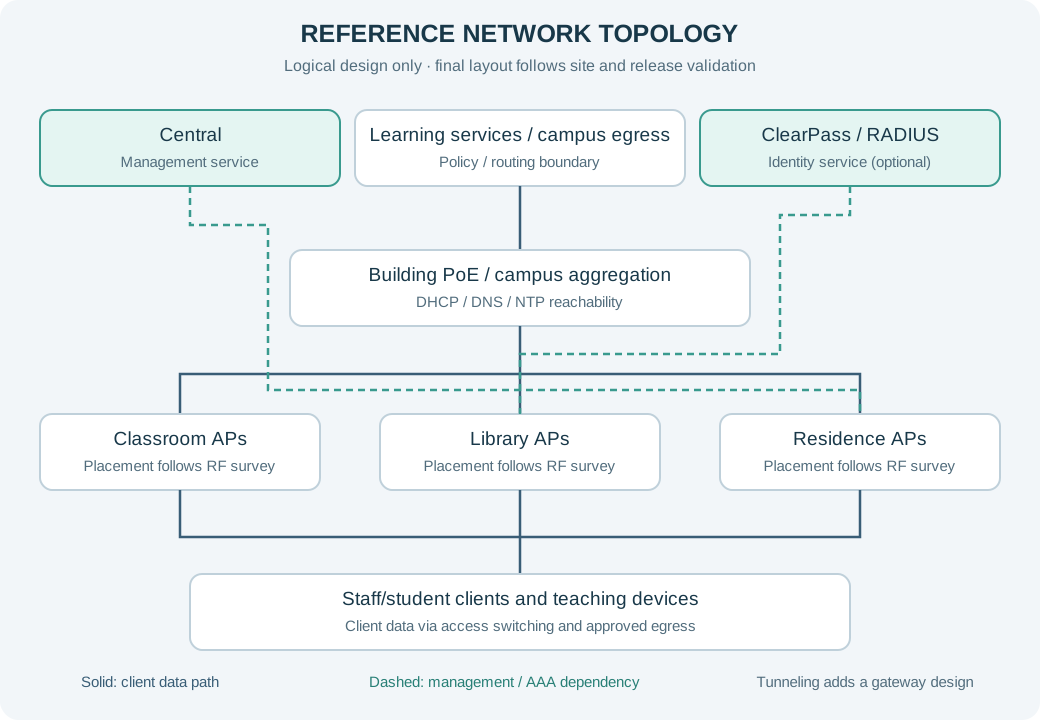
Use zone-specific AP design and building aggregation. Identity authorization determines staff, student, visitor and teaching-device access. Address retention across buildings depends on forwarding and VLAN boundaries and needs route testing. Limit teaching-device discovery to intended rooms or identities and test access enforcement as well.
Dashed paths denote logical management or authentication dependencies, not physical direct cables. Central is the management service, not the client data-plane transit point. If tunneling is chosen, redraw and validate the AP-to-gateway path and the authenticator location for that mode.
SSID, segment and access-policy example
| Segment / example VLAN | Access policy |
|---|---|
| STAFF / VLAN 410 | Staff identity with role-appropriate administrative and shared resources. |
| STUDENT / VLAN 420 | Student identity with learning access and restricted administration zones. |
| TEACHING / VLAN 430 | Authorize displays, printing and specialist endpoints by area and capability. |
| GUEST / VLAN 440 | Time-limited visitors with restricted campus systems and a defined support route. |
Names and VLAN IDs above are illustrative and must be mapped to the customer address plan. A VLAN is not a complete security boundary: enforce the approved ACL/firewall/role policy at the selected forwarding points and verify both allow and deny behavior. Publish only the minimum necessary SSIDs and verify legacy-client exceptions separately.
4. Implementation plan
- Academic discovery:Collect timetables, exam windows, directories and clients; separate teaching, library and residence demand.
- Zone surveys:Trial placement against seat layouts, adjacent classrooms and residence walls; verify interference and bidirectional use.
- Shared-service readiness:Plan ownership, VLANs, address pools and uplinks by campus/building; verify identity and trust chains.
- Access and discovery:Test staff/student roles, special-device exceptions, casting scope and leaver revocation.
- Representative pilot:Pilot a teaching floor and residence zone, reproducing class starts, exam logins and evening load.
- Building rollout:Avoid exams; hand over drawings, demand models, policies, rollback and operator training.
Change control and rollback gate
Before each batch, name the change owner, business approver and recovery operator. Preserve the approved pre-change configuration and verify that the hardware/software supports the intended recovery. Stop or roll back if critical transactions fail, identity rules are wrong or agreed recovery limits are exceeded. Capture timestamps and logs before altering the next variable.
5. Configuration and procurement checklist
| Candidate / component | Items to confirm |
|---|---|
| AP-635 | Regional SKU, current availability, supported software, power, included components and lifecycle. |
| AP-735 | Regional SKU, current availability, supported software, power, included components and lifecycle. |
| AP-605H | Regional SKU, current availability, supported software, power, included components and lifecycle. |
| CX 6300M | Regional SKU, current availability, supported software, power, included components and lifecycle. |
| Management and access | Management version, device tier, term, account ownership, AAA capacity and required service integrations. |
| Installation and services | Mounts, antennas, power supplies, optics, cabling, survey, commissioning, training and agreed support scope. |
6. Acceptance and operational handover
- Test the class-start or exam-login model across RADIUS, DHCP and learning applications.
- Verify staff, student, guest and shared-device policies and leaver revocation.
- Run concurrent adjacent-classroom tests with application success and retry measurements.
- Measure building-transition routes and residence peaks with client, location, band and timestamps.
Agree numeric coverage, SNR, packet-loss, latency and recovery thresholds with the application owner before the pilot. Record locations, representative clients, load and software so results can be reproduced.
7. Prepare a project request
Send scaled plans, device and application schedules, current software and topology, power and cabling records, destination and rollout constraints. We use these inputs to discuss a project-specific configuration and quotation.
8. Regional and architecture checks
Product families above are candidates for evaluation. Confirm exact destination SKUs, certifications, permitted channels and software support before ordering. For mainland China, global 6 GHz capability does not establish local permission to enable it. AOS 8, AOS 10 and Central features require version-specific verification.
Apply the guidance to your project
Share the model, quantity, destination and existing network so we can discuss the complete configuration.
Discuss configuration & quotation ↗