
SELECTION & PROCUREMENT
Aruba hotel AP retrofit guide: cabling, PoE and room Ethernet
Prepared by Xunhui Information · English publication: 2026-11-24
Plan a wallplate AP retrofit with AP-505H/AP-725H wired requirements, separate input/output power budgets, a reference topology and practical migration and acceptance checklists.
On this page
Start with two separate checks: data and power
Before replacing hotel wallplate access points, inventory each room link, switch port, PoE class and the way phones and IPTV connect. A working gigabit link establishes its current negotiation result. A multigigabit replacement still needs testing at the intended speed and power mode under application load. Design wireless coverage, room Ethernet services and management together.
This guide supports retrofit assessment where room outlets already exist. The topology is a design example, and the checklists are survey methods. Survey results and business requirements determine AP quantities, regional SKUs and acceptance thresholds. Confirm destination approvals and permitted bands before ordering; global radio capabilities do not establish local permission.
Requirements: build a room and floor inventory
| Area | Record | Decision supported |
|---|---|---|
| Room and coverage | Floor plans, walls, outlet positions, bedside/desk/bathroom test points and adjacent coverage | Wallplate versus ceiling placement and pilot room types |
| Existing link | Room-to-panel-to-port mapping, cable markings, length, terminations and test reports | Target uplink speed and cabling remediation |
| Room endpoints | Phone, IPTV, desk and IoT port counts, VLANs, power and authentication | AP downlinks, PSE output and isolation |
| Floor switch | Exact model, port speeds, per-port PoE, total budget, PSUs and UPS arrangement | Switch/PSU changes and port allocation |
| Management | AP/controller models, software, Central tenant/subscriptions, identity and guest systems | Coexistence, migration and rollback boundaries |
| Installation | Wall boxes, mounting surfaces, obstructions, room access windows and tamper requirements | Mounting kits and work batches |
Express needs as testable requirements: the phone must receive power from an AP downlink, the TV retains wired access, and guests cannot reach staff devices. A target of one AP per room does not define coverage or service quality.
AP-505H and AP-725H: verify wired requirements
| Item | AP-505H | AP-725H |
|---|---|---|
| Wireless generation | Wi-Fi 6 | Wi-Fi 7; features depend on destination and clients |
| Maximum E0 negotiation | 2.5GbE | 5GbE |
| Room Ethernet | Four gigabit ports, E1–E4 | Four gigabit ports, E1–E4 |
| Unrestricted power input | DC or 802.3bt Class 6 | DC or 802.3bt Class 6 |
| Downlink PoE | E1/E2: dual 802.3af, or a single 802.3at on E1, subject to input mode and available budget | |
This comparison supports interface and power planning. Software, subscriptions and mounting accessories must be checked separately. Review the AP-505H, AP-725H and management subscription checklist. Lifecycle, architecture, supply and budget also affect the purchase decision.
Design: service isolation and reference topology
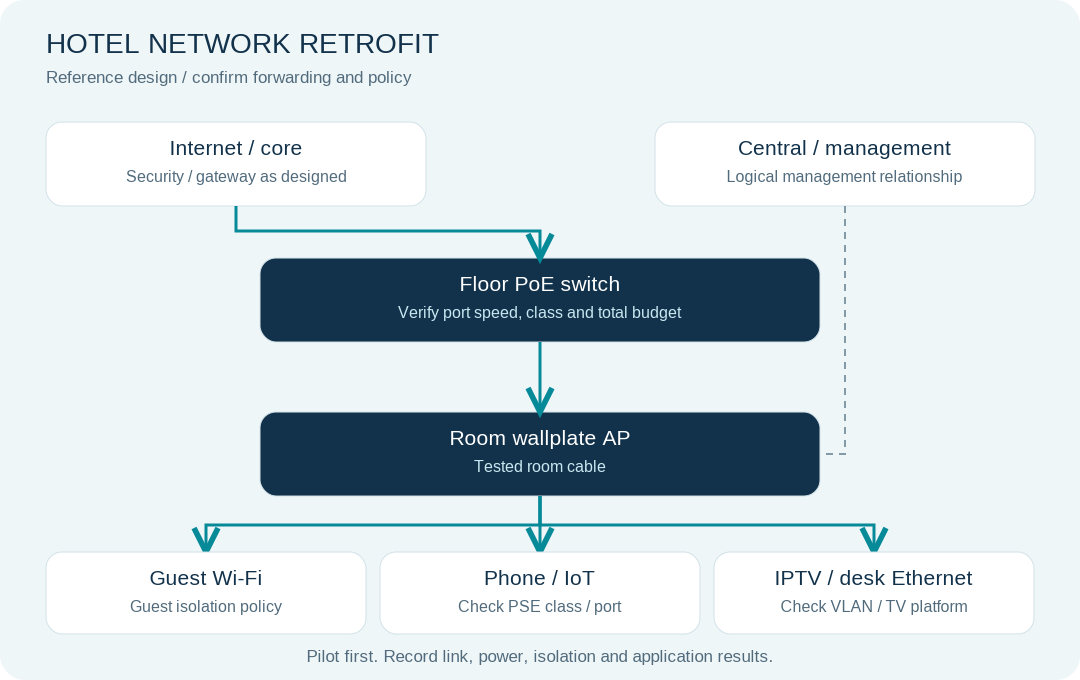
Define access boundaries for guests, staff, voice, IPTV/IoT and device management before mapping them to SSIDs, wired ports, VLANs and policy. Document required cross-network access explicitly. Different SSID names alone do not enforce isolation. Include guest client isolation, operations access, DHCP/DNS and authentication dependencies in the pilot.
Confirm whether television uses unicast or multicast and obtain the television platform requirements. Design multicast handling, QoS and uplink capacity around real traffic. Keep television and guest traffic separated according to the tested design. Central management and application forwarding are separate relationships. Choose a supported architecture before confirming gateways/controllers, accounts and licenses; see the AOS migration checklist.
Implementation: budget AP input and endpoint output separately
Per-port capability, the switch-wide power budget and the failure-case budget must all pass. The switch powers the AP, which may then power a phone. Each direction has limits. A PoE label or spare total wattage does not establish that an individual port meets the requirement.
For AP-505H with IPM disabled, Class 4 permits 802.3af PSE on E1 only and disables USB when PSE is enabled; Class 3 disables USB and PSE. Design the required input for the intended feature set. Dynamic IPM restrictions are not a substitute for capacity planning. Check each other model's own power matrix.
| Level | Check |
|---|---|
| AP input port | The switch port must provide the input class required by the intended operating mode; verify negotiation and configured limits. |
| Room downlinks | Endpoint classes, port count and combinations must fit the AP output capability in that input mode. |
| Normal switch budget | Reserved input power for all APs plus other powered devices must fit the usable switch PoE budget. |
| Failure and restart | Recalculate for the actual PSU arrangement; check priorities, simultaneous startup and the agreed UPS runtime. |
Use a consistent measurement boundary. AP consumption and PSE allocation are different values; account for cabling loss and determine whether the published AP figure already includes USB/downlink PSE before adding loads. Agree reserve capacity and recovery targets for the project. Use the CX and PoE design topic and power checklist for detailed preparation.
Existing cabling and mounts: test before replacing
- Verify room and port mapping, pairs, length, terminations and panels. Cable jacket markings are survey evidence rather than a performance test.
- Select tests appropriate to the target speed. Record negotiation, errors, loss and stability under load; continuity or wire-map testing alone is insufficient.
- Validate sustained PoE as well as negotiation. Investigate speed fallback, power loss and endpoint reboots separately across cabling, power and configuration.
- Check wall boxes, kits, ventilation and cable clearance. Confirm old bracket compatibility physically and avoid metal enclosures or obstructive furniture.
- If a link supports current services reliably but fails the new target, document the limit and assess staged remediation. Any interim speed must meet agreed business acceptance requirements.
Migration and acceptance
- Pilot rooms: choose representative layouts, difficult coverage points and endpoint combinations. Back up configurations and document rollback cabling.
- Preconfiguration: verify supported software, tenant ownership, subscriptions, SSIDs, wired ports and policy. Check management and authentication dependencies in an isolated test environment.
- Application tests: test agreed clients at bedside, desk and bathroom points. Record signal, SNR, retries, throughput and voice/video behavior against business thresholds.
- Wired services and isolation: verify TV, phones and IoT, denied access to staff/management networks and permitted application flows.
- Power and recovery: record the actual PoE mode, endpoint power and error counters. Test link/restart recovery in a maintenance window; define the impact before PSU failure tests.
- Floor batches: expand only after the pilot passes. Record ports, serial numbers and results for each room and apply the agreed rollback criteria to failed batches.
Acceptance records should identify client models, software, time, location, concurrency and measurement method. An illuminated AP, a loaded webpage or a high displayed wireless link rate alone is not a complete acceptance result.
Prepare a configuration and quotation request
Provide room/floor plans, room and outlet counts, exact existing AP/switch models and software, cabling reports, phone/IPTV/IoT inventory, management/authentication requirements, access windows and delivery destination. Remove unrelated personal or customer information. Mark unknown items as requiring a survey.
Separate the BOM into APs, mounting kits, power, switches/uplinks, management subscriptions and implementation/acceptance services. Quantities follow verified points and the agreed spare policy. Pricing is quoted in USD; delivery scope and lead time are confirmed per order. Use the hospitality wireless design and project BOM checklist, then request a configuration and quotation.
Apply the guidance to your project
Share the model, quantity, destination and existing network so we can discuss the complete configuration.
Discuss configuration & quotation ↗